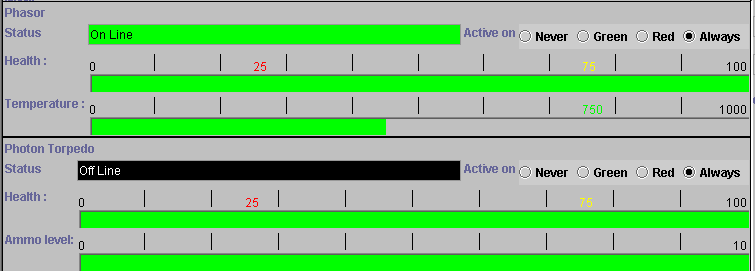
When a device class status panel's button is clicked then the internal state of all devices of that class is displayed in the main screen area. These 'Device Control Panels' are used to observe and control how each device will behave in different circumstances. A typical device control panel looks something like this :-
This panel shows two devices from the weapons class. For each device the following standard information is shown:-
The device type.
A 'status' indicator showing if the device is currently 'on line' (ie doing something and drawing power) or 'off line'.
A series of radio buttons defining under what conditions a device may go 'on line'. This will not force it 'on line' but enable it to switch on when it is next asked to do something. Possible conditions are :-
Never - Never go on line.
Green - On line on green alert
Red - On line on red alert
Always - On line on green and red alert.
A heath meter indicating how damaged the device currently is.
This if followed by any displays and controls specific to the device type. In this case the temperature of the beam weapon and the ammunition level of the projectile weapon.
To close the 'control panel' select any other operation that uses the main screen area.